Android bootloader analysis (2) - LinuxLoader and Knox Verified Boot
Introduction
In the previous post, we looked at the high-level Qualcomm boot chain: PBL, XBL, UEFI, and ABL. In this post, we’ll move one step deeper and focus on LinuxLoader, one of the UEFI applications used in Qualcomm’s Android Boot Loader.
LinuxLoader is responsible for preparing, verifying, and loading the Android kernel. On Qualcomm-based Android devices, this is also where Android Verified Boot (AVB) is commonly handled before execution is transferred to the kernel.
Samsung devices add another interesting layer on top of this. In addition to the standard Android Verified Boot flow, Samsung implements its own vendor-specific verification logic, commonly referred to as Knox Verified Boot (KVB). Since Samsung’s bootloader is proprietary, this post analyzes KVB behavior from a reverse-engineering perspective rather than from source code.
The goal of this post is not to fully document every detail of Samsung’s boot chain. Instead, we’ll first understand how LinuxLoader works at a high level, then look at several Samsung-specific verification routines observed in the ABL binary.
LinuxLoader
LinuxLoader is a UEFI application that runs inside ABL. Its main job is to decide which boot path to take, verify the required boot images, prepare the boot parameters, and finally jump into the Linux kernel.
A public reference implementation of Qualcomm’s LinuxLoader is available in the historical Code Aurora ABL TianoCore EDK2 tree:
Vendor bootloaders are not guaranteed to match this source code exactly. Device vendors often add custom logic, additional security checks, proprietary download modes, and product-specific features. Still, the public LinuxLoader source is very useful for understanding the general control flow.
The following is the entry point of LinuxLoader.
EFI_STATUS EFIAPI LinuxLoaderEntry(IN EFI_HANDLE ImageHandle, IN EFI_SYSTEM_TABLE *SystemTable)
{
  EFI_STATUS Status;

  UINT32 BootReason = NORMAL_MODE;
  UINT32 KeyPressed;
  /* MultiSlot Boot */
  BOOLEAN MultiSlotBoot;

  DEBUG((EFI_D_INFO, "Loader Build Info: %a %a\n", __DATE__, __TIME__));

  StackGuardChkSetup();

  BootStatsSetTimeStamp(BS_BL_START);

  // Initialize verified boot & Read Device Info
  Status = DeviceInfoInit();
  if (Status != EFI_SUCCESS)
  {
    DEBUG((EFI_D_ERROR, "Initialize the device info failed: %r\n", Status));
    goto stack_guard_update_default;
  }

  Status = EnumeratePartitions();

  if (EFI_ERROR (Status)) {
    DEBUG ((EFI_D_ERROR, "LinuxLoader: Could not enumerate partitions: %r\n", Status));
    goto stack_guard_update_default;
  }

  UpdatePartitionEntries();
  /*Check for multislot boot support*/
  MultiSlotBoot = PartitionHasMultiSlot(L"boot");
  if(MultiSlotBoot) {
    DEBUG((EFI_D_VERBOSE, "Multi Slot boot is supported\n"));
    FindPtnActiveSlot();
  }

  Status = GetKeyPress(&KeyPressed);
  if (Status == EFI_SUCCESS)
  {
    if (KeyPressed == SCAN_DOWN)
      BootIntoFastboot = TRUE;
    if (KeyPressed == SCAN_UP)
      BootIntoRecovery = TRUE;
    if (KeyPressed == SCAN_ESC)
      RebootDevice(EMERGENCY_DLOAD);
  }
  else if (Status == EFI_DEVICE_ERROR)
  {
    DEBUG((EFI_D_ERROR, "Error reading key status: %r\n", Status));
    goto stack_guard_update_default;
  }

  // check for reboot mode
  Status = GetRebootReason(&BootReason);
  if (Status != EFI_SUCCESS)
  {
    DEBUG((EFI_D_ERROR, "Failed to get Reboot reason: %r\n", Status));
    goto stack_guard_update_default;
  }

  switch (BootReason)
  {
    case FASTBOOT_MODE:
      BootIntoFastboot = TRUE;
      break;
    case RECOVERY_MODE:
      BootIntoRecovery = TRUE;
      break;
    case ALARM_BOOT:
      BootReasonAlarm = TRUE;
      break;
    case DM_VERITY_ENFORCING:
      // write to device info
      Status = EnableEnforcingMode(TRUE);
      if (Status != EFI_SUCCESS)
        goto stack_guard_update_default;
      break;
    case DM_VERITY_LOGGING:
      /* Disable MDTP if it's Enabled through Local Deactivation */
      Status = MdtpDisable();
      if(EFI_ERROR(Status) && Status != EFI_NOT_FOUND) {
        DEBUG((EFI_D_ERROR, "MdtpDisable Returned error: %r\n", Status));
        goto stack_guard_update_default;
      }
      // write to device info
      Status = EnableEnforcingMode(FALSE);
      if (Status != EFI_SUCCESS)
        goto stack_guard_update_default;

      break;
    case DM_VERITY_KEYSCLEAR:
      Status = ResetDeviceState();
      if (Status != EFI_SUCCESS) {
        DEBUG((EFI_D_ERROR, "VB Reset Device State error: %r\n", Status));
        goto stack_guard_update_default;
      }
      break;
    default:
      break;
  }

  Status = RecoveryInit(&BootIntoRecovery);
  if (Status != EFI_SUCCESS)
    DEBUG((EFI_D_VERBOSE, "RecoveryInit failed ignore: %r\n", Status));

  if (!BootIntoFastboot) {
    BootInfo Info = {0};
    Info.MultiSlotBoot = MultiSlotBoot;
    Info.BootIntoRecovery = BootIntoRecovery;
    Info.BootReasonAlarm = BootReasonAlarm;
    Status = LoadImageAndAuth(&Info);
    if (Status != EFI_SUCCESS) {
      DEBUG((EFI_D_ERROR, "LoadImageAndAuth failed: %r\n", Status));
      goto fastboot;
    }

    BootLinux(&Info);
  }

fastboot:
  DEBUG((EFI_D_INFO, "Launching fastboot\n"));
  Status = FastbootInitialize();
  if (EFI_ERROR(Status))
  {
    DEBUG((EFI_D_ERROR, "Failed to Launch Fastboot App: %d\n", Status));
    goto stack_guard_update_default;
  }

stack_guard_update_default:
  /*Update stack check guard with defualt value then return*/
   __stack_chk_guard = DEFAULT_STACK_CHK_GUARD;
  return Status;
}
At a high level, the LinuxLoader entry flow can be divided into three phases.
Initialize device and partition information Determine the requested boot mode Verify, load, and boot the selected image
The boot mode determines what LinuxLoader should do next. In a normal boot, it loads the Android kernel. In recovery mode, it loads the recovery path. In download mode, such as Fastboot or a vendor-specific flashing mode, it starts an interactive firmware update or recovery interface instead.
The most important part for the normal boot path is the call to LoadImageAndAuth() followed by BootLinux().
    BootInfo Info = {0};
    Info.MultiSlotBoot = MultiSlotBoot;
    Info.BootIntoRecovery = BootIntoRecovery;
    Info.BootReasonAlarm = BootReasonAlarm;
    Status = LoadImageAndAuth(&Info);
    if (Status != EFI_SUCCESS) {
      DEBUG((EFI_D_ERROR, "LoadImageAndAuth failed: %r\n", Status));
      goto fastboot;
    }

    BootLinux(&Info);
LoadImageAndAuth() is responsible for selecting the correct boot image, authenticating it, and storing the resulting image information in a BootInfo structure. Once this function succeeds, BootLinux() uses the prepared information to transfer execution to the kernel.
Internally, LinuxLoader chooses the verification path based on the Android Verified Boot version.
  AVBVersion = GetAVBVersion();
  DEBUG((EFI_D_VERBOSE, "AVB version %d\n", AVBVersion));

  /* Load and Authenticate */
  switch (AVBVersion) {
  case NO_AVB:
            return LoadImageNoAuthWrapper (Info);
    break;
  case AVB_1:
    Status = LoadImageAndAuthVB1(Info);
    break;
  case AVB_2:
    Status = LoadImageAndAuthVB2(Info);
    break;
  default:
    DEBUG((EFI_D_ERROR, "Unsupported AVB version %d\n", AVBVersion));
    Status = EFI_UNSUPPORTED;
  }
Modern Android devices generally use AVB 2.0, so the LoadImageAndAuthVB2() path is usually the interesting one. This path verifies the relevant Android boot metadata and images before they are accepted for boot.
The BootInfo structure used by LinuxLoader looks like this.
typedef struct BootInfo {
  BOOLEAN MultiSlotBoot;
  BOOLEAN BootIntoRecovery;
  BOOLEAN BootReasonAlarm;
  CHAR16 Pname[MAX_GPT_NAME_SIZE];
  CHAR16 BootableSlot[MAX_GPT_NAME_SIZE];
  ImageData Images[MAX_NUMBER_OF_LOADED_IMAGES];
  UINTN NumLoadedImages;
  QCOM_VERIFIEDBOOT_PROTOCOL *VbIntf;
  boot_state_t BootState;
  CHAR8 *VBCmdLine;
  UINT32 VBCmdLineLen;
  UINT32 VBCmdLineFilledLen;
  VOID    *VBData;
} BootInfo;

typedef struct {
  CHAR8 *Name;
  VOID *ImageBuffer;
  UINTN ImageSize;
} ImageData;
The Images array contains the loaded images that will be used for boot. From a security perspective, this structure is important because it represents the boundary between “verified image data” and “image data that will actually be booted.”
If an attacker gains code execution inside the ABL context before the kernel is launched, one possible goal would be to tamper with the image buffers, image sizes, command line, or other fields in BootInfo. In practice, this may not be enough by itself. Vendor-specific checks, communication with secure world components, rollback protection, and device state checks may still affect the final boot decision. However, this structure is still a useful point to understand when analyzing the boot flow.
The AVB design itself is documented in the Android Open Source Project:
https://android.googlesource.com/platform/external/avb/+/main/README.md
Since AVB is already well documented and has public source code, this post will not go deeply into AVB internals. Instead, we’ll focus on the Samsung-specific verification logic that appears in the proprietary LinuxLoader binary.
Knox Verified Boot
Samsung adds additional boot integrity checks on top of the standard Android Verified Boot flow. This mechanism is commonly referred to as Knox Verified Boot, or KVB.
Samsung provides a high-level explanation of Knox Verified Boot here:
https://www.samsungknox.com/en/blog/knox-deep-dive-knox-verified-boot
However, the implementation itself is proprietary. The following analysis is based on static reverse engineering of Samsung’s LinuxLoader binary. Function names are inferred where symbols are not available, so the names used in this post should be understood as analysis labels rather than official names.
While analyzing Samsung’s LinuxLoader, I found additional verification routines inside the image loading path. These routines do not exist in Qualcomm’s public LinuxLoader source.
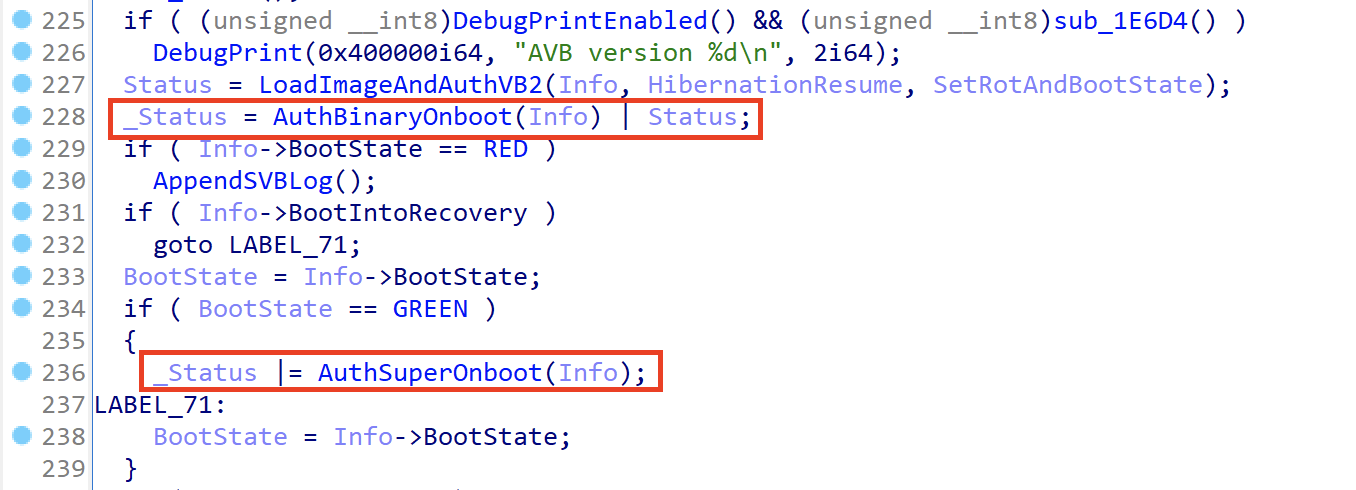
Two interesting functions are AuthBinaryOnboot() and AuthSuperOnboot(). I could not find references to these function names in public Qualcomm sources, GitHub, or Google search results, so they appear to be Samsung-specific additions.
Based on the control flow, these functions perform additional verification for selected partitions during boot.
AuthBinaryOnboot() verifies several boot-related partitions, including:
vbmetabootdtborecoveryvendor_bootinit_boot
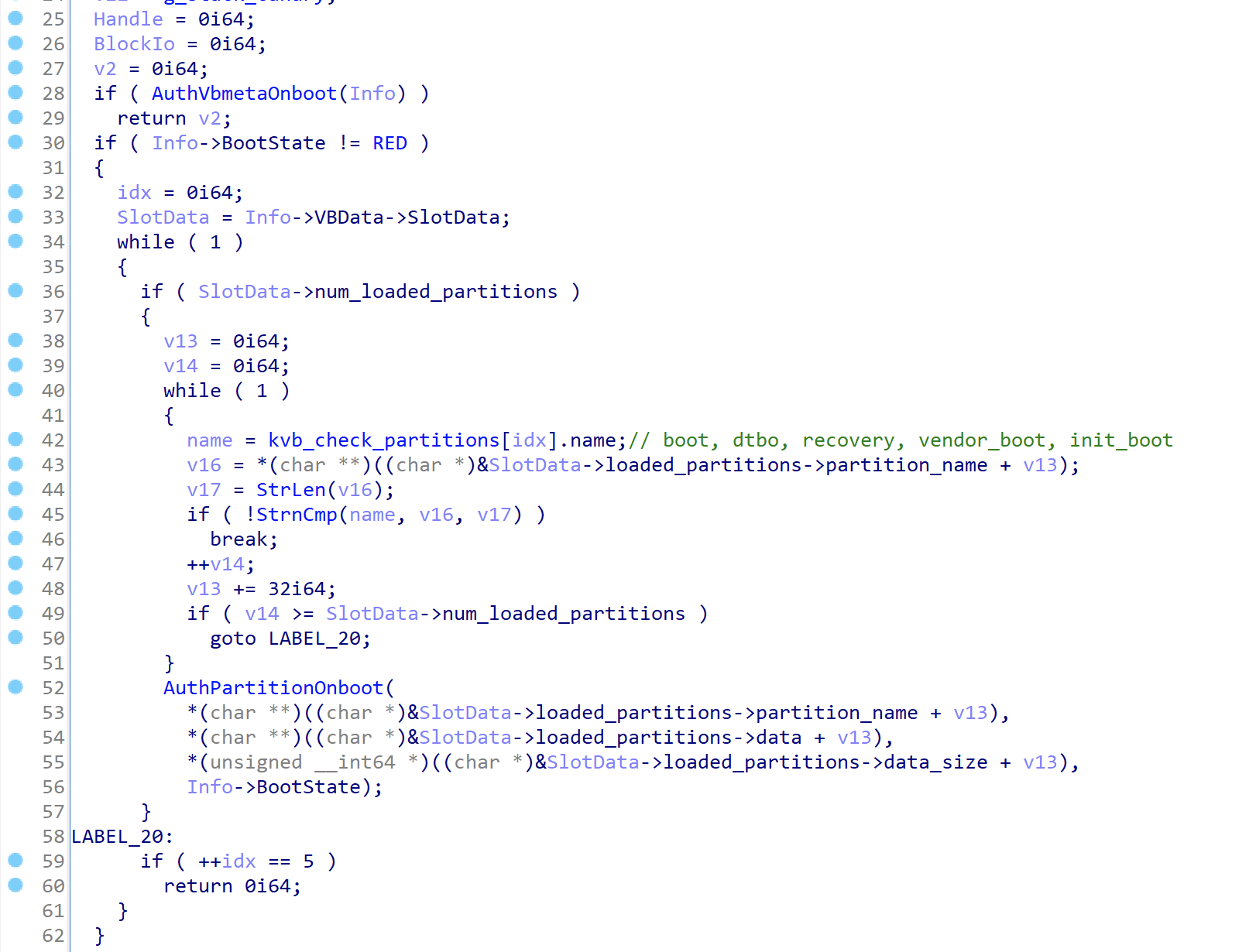
AuthSuperOnboot() appears to verify metadata associated with the super partition, including a Build-Id value.
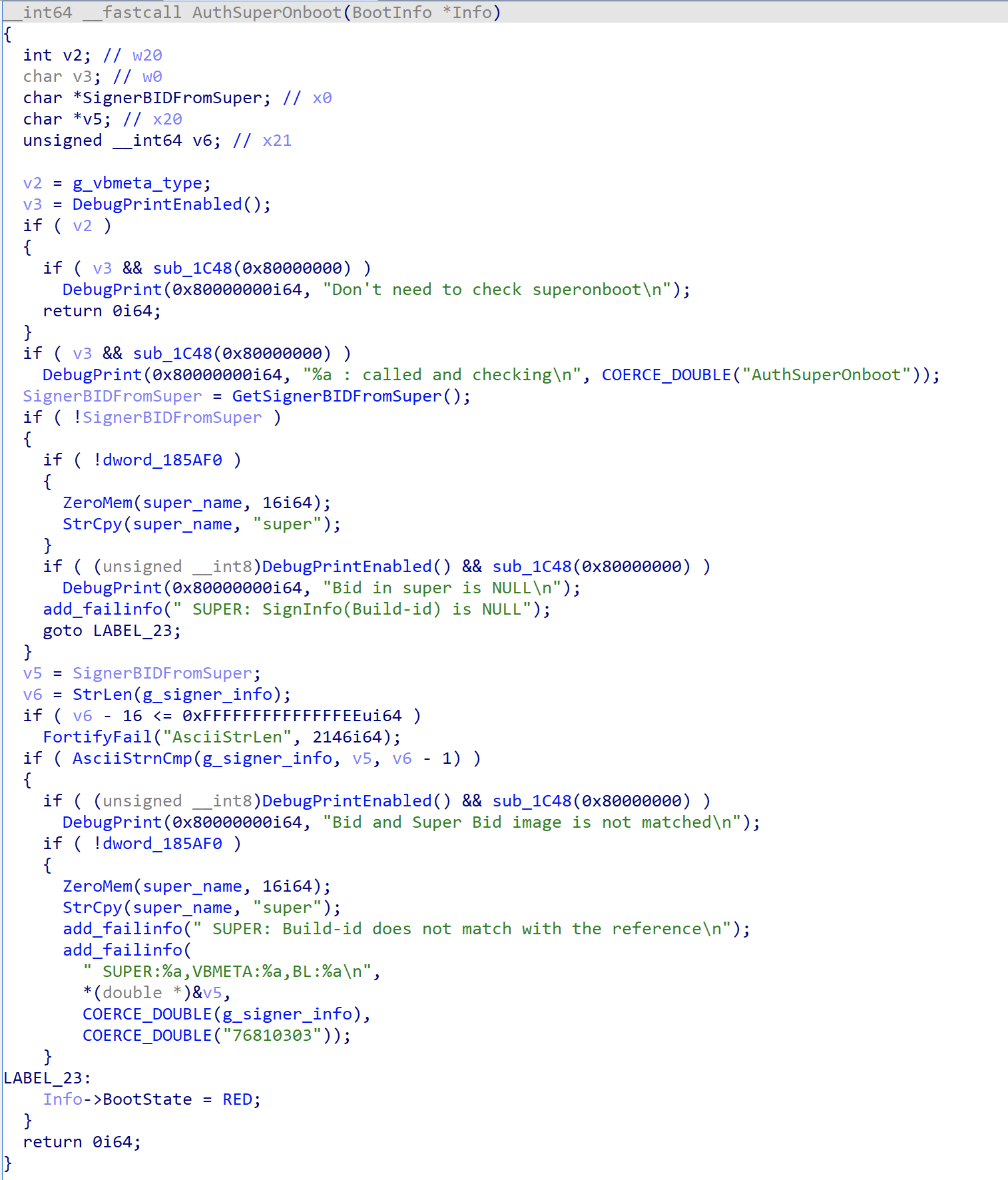
This suggests that Samsung’s bootloader does not rely only on the standard AVB path. It also performs additional vendor-specific checks over important boot and system-related partitions.
Samsung-specific signature metadata
To understand the signature scheme, I looked at the extra metadata appended to the verified images. This metadata is separate from the standard AVB structures.
For example, the following is the signature-related metadata found in a vbmeta image.
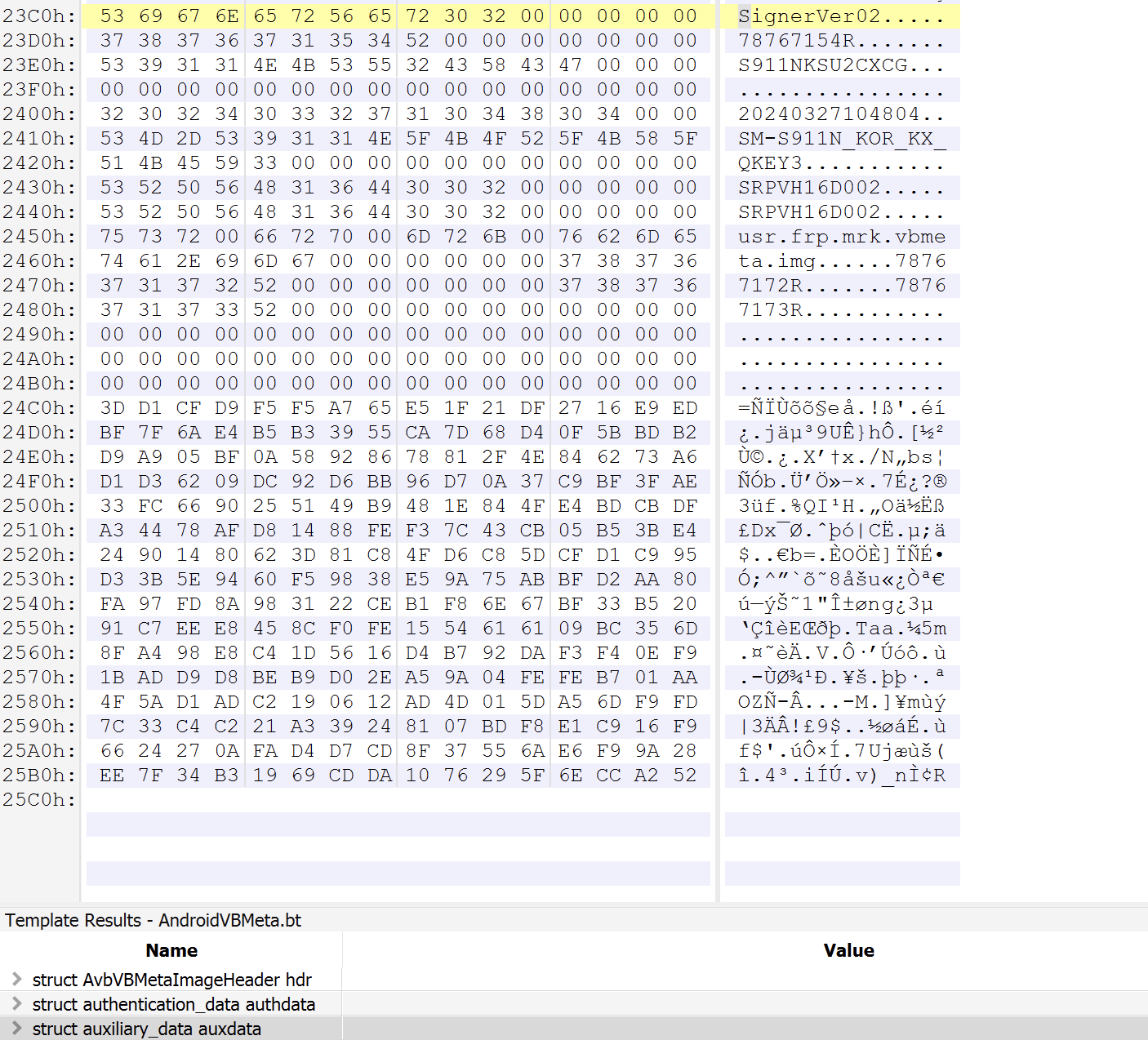
The metadata contains fields such as:
- signature revision
- build ID
- version name
- build time
- rollback protection index
- signature data
These fields are then consumed by Samsung’s verification routines during boot.
The following is the function I labeled AuthPartitionOnboot().
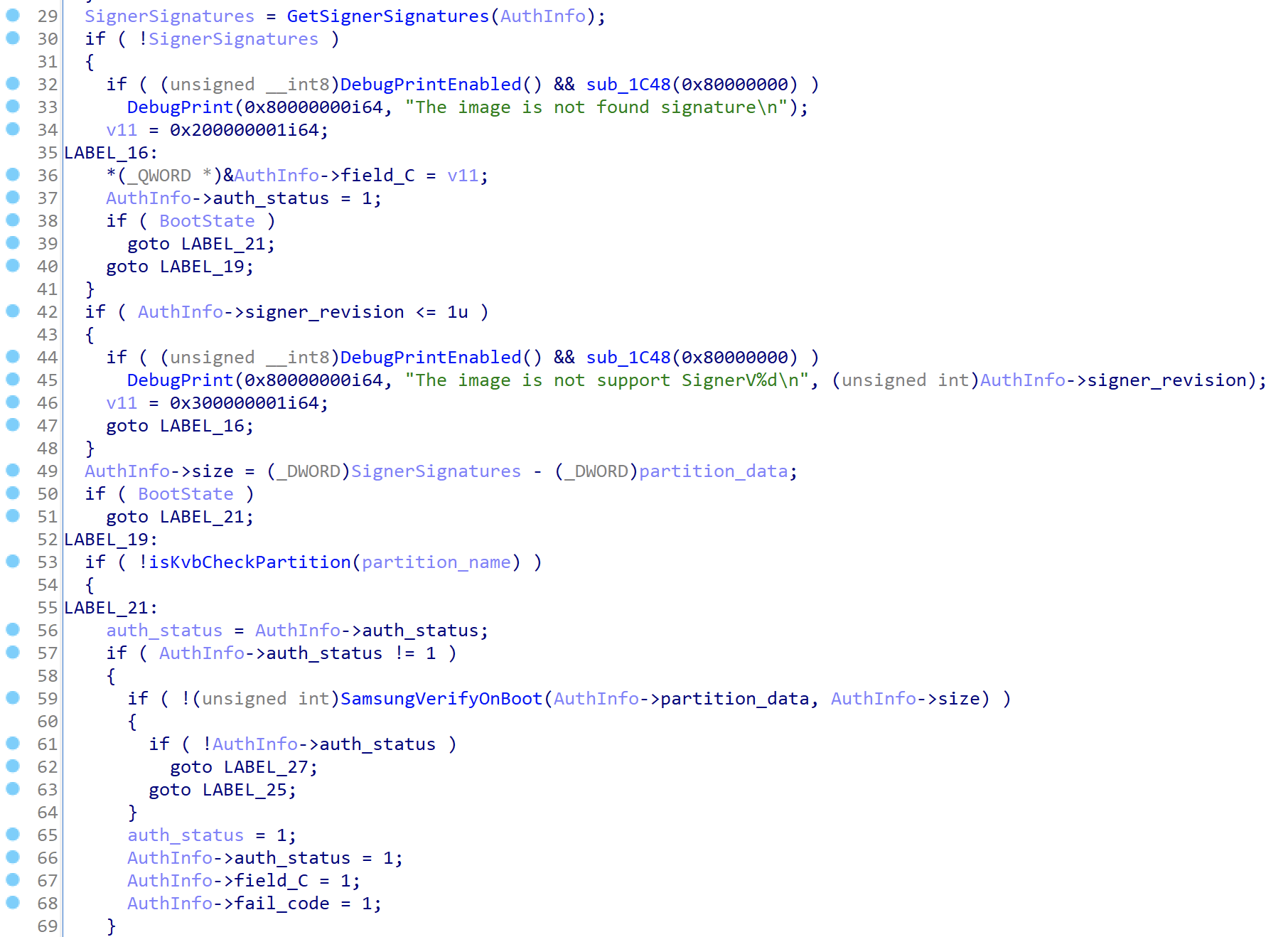
In this function, the signer revision is checked first. For the vbmeta partition, execution eventually reaches another function that I labeled SamsungVerifyOnBoot().
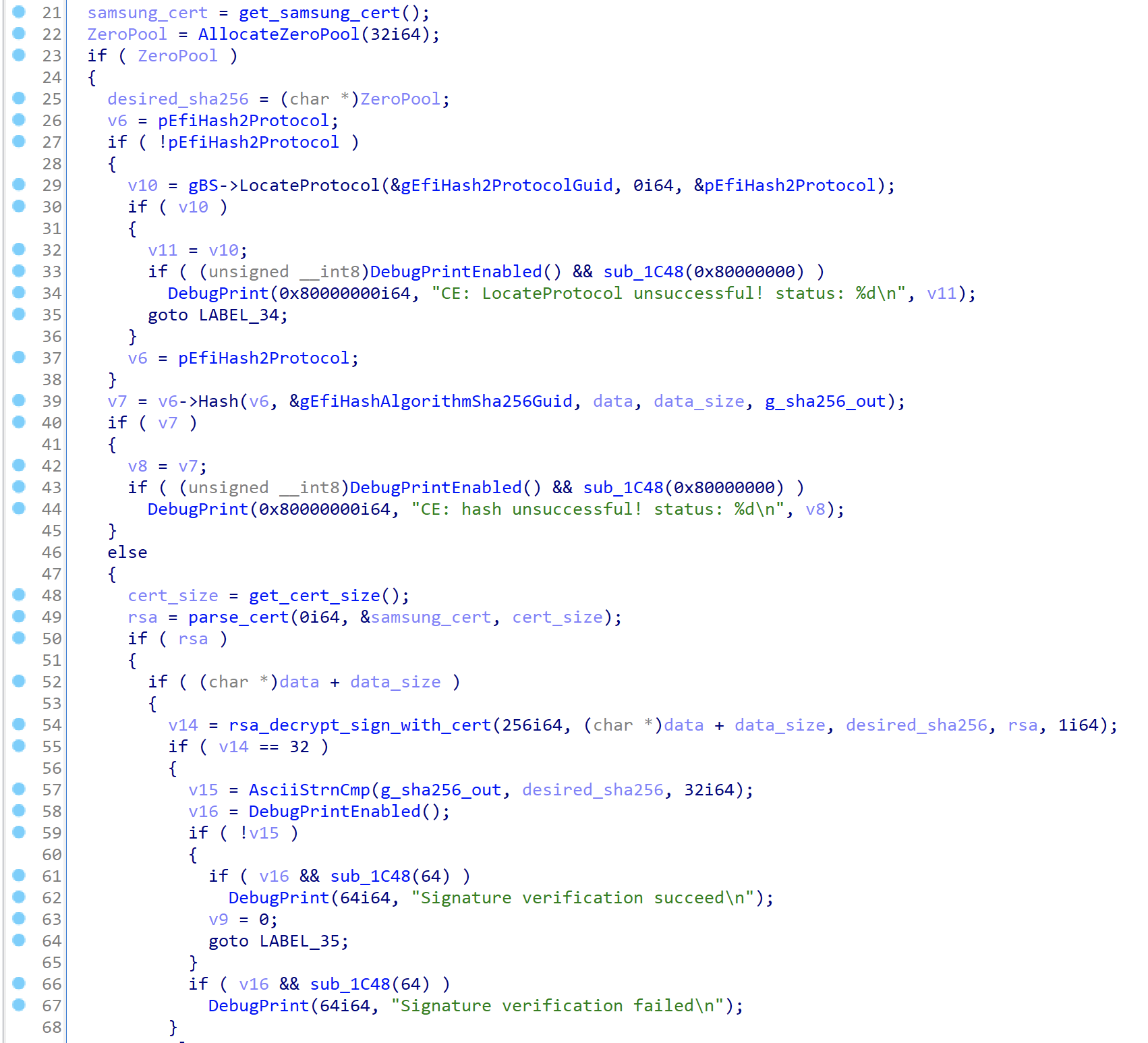
SamsungVerifyOnBoot() loads a statically embedded RSA public key and verifies the signature over the image data. Based on the implementation, the scheme appears to be similar to RSA PKCS #1 v1.5 with SHA-256.
The following image shows the overall verification flow inside SamsungVerifyOnBoot().
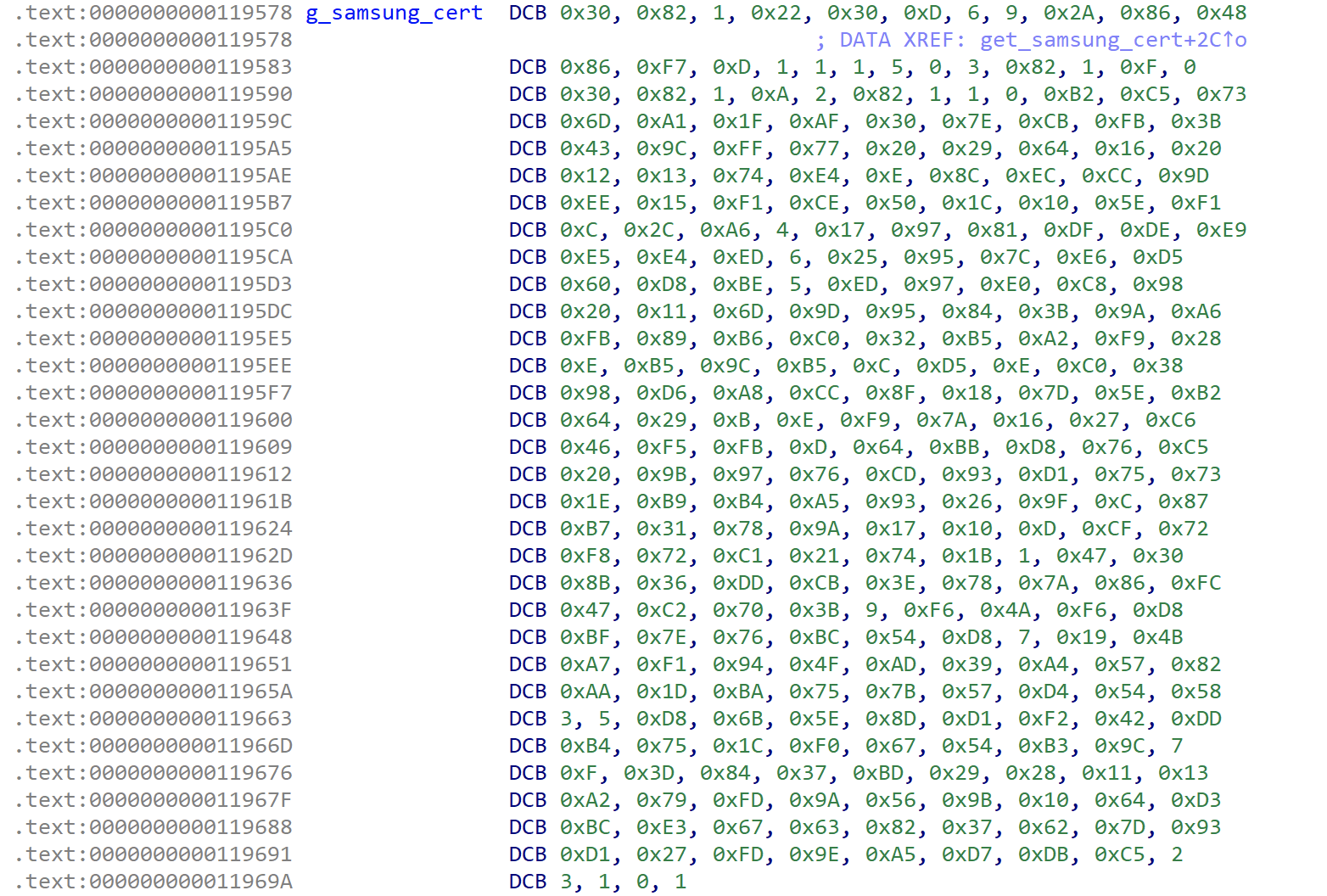
The RSA public key certificate is embedded directly inside LinuxLoader.
To validate my understanding, I implemented a small Python script that reproduces the verification logic for vbmeta.img.
from Crypto.Util.number import *
from Crypto.PublicKey import RSA
from Crypto.Hash import SHA256

with open("vbmeta.img", "rb") as f:
    vbmeta = f.read()

data, signature = vbmeta[:-0x100], vbmeta[-0x100:]
hsh = SHA256.new(data).digest()

cert = b'0\x82\x01"0\r\x06\t*\x86H\x86\xf7\r\x01\x01\x01\x05\x00\x03\x82\x01\x0f\x000\x82\x01\n\x02\x82\x01\x01\x00\xb2\xc5sm\xa1\x1f\xaf0~\xcb\xfb;C\x9c\xffw )d\x16 \x12\x13t\xe4\x0e\x8c\xec\xcc\x9d\xee\x15\xf1\xceP\x1c\x10^\xf1\x0c,\xa6\x04\x17\x97\x81\xdf\xde\xe9\xe5\xe4\xed\x06%\x95|\xe6\xd5`\xd8\xbe\x05\xed\x97\xe0\xc8\x98 \x11m\x9d\x95\x84;\x9a\xa6\xfb\x89\xb6\xc02\xb5\xa2\xf9(\x0e\xb5\x9c\xb5\x0c\xd5\x0e\xc08\x98\xd6\xa8\xcc\x8f\x18}^\xb2d)\x0b\x0e\xf9z\x16\'\xc6F\xf5\xfb\rd\xbb\xd8v\xc5 \x9b\x97v\xcd\x93\xd1us\x1e\xb9\xb4\xa5\x93&\x9f\x0c\x87\xb71x\x9a\x17\x10\r\xcfr\xf8r\xc1!t\x1b\x01G0\x8b6\xdd\xcb>xz\x86\xfcG\xc2p;\t\xf6J\xf6\xd8\xbf~v\xbcT\xd8\x07\x19K\xa7\xf1\x94O\xad9\xa4W\x82\xaa\x1d\xbau{W\xd4TX\x03\x05\xd8k^\x8d\xd1\xf2B\xdd\xb4u\x1c\xf0gT\xb3\x9c\x07\x0f=\x847\xbd)(\x11\x13\xa2y\xfd\x9aV\x9b\x10d\xd3\xbc\xe3gc\x827b}\x93\xd1\'\xfd\x9e\xa5\xd7\xdb\xc5\x02\x03\x01\x00\x01'
key = RSA.import_key(cert)

print("=== Public key information ===")
print(f"RSA N: {key.n:#x}")
print(f"RSA e: {key.e:#x}\n")

sign_int = bytes_to_long(signature)
msg = long_to_bytes(pow(sign_int, key.e, key.n))
msg = msg[msg.find(b'\x00') + 1:]   # Eliminate pkcs#1 v1.5 padding

print("=== Signature information ===")
print(f"data hash: {hsh.hex()}")
print(f"signature msg: {msg.hex()}\n")

print(f"Signature is {'valid' if hsh == msg else 'invalid'}")
The result matched the value produced by the bootloader logic.

This confirms that the additional Samsung metadata is not just informational. It is actively used by the bootloader as part of the boot-time verification process.
Additional KVB checks
Signature verification is only one part of the Samsung-specific logic. I also observed other checks related to rollback protection, FRP state, and device integrity state.
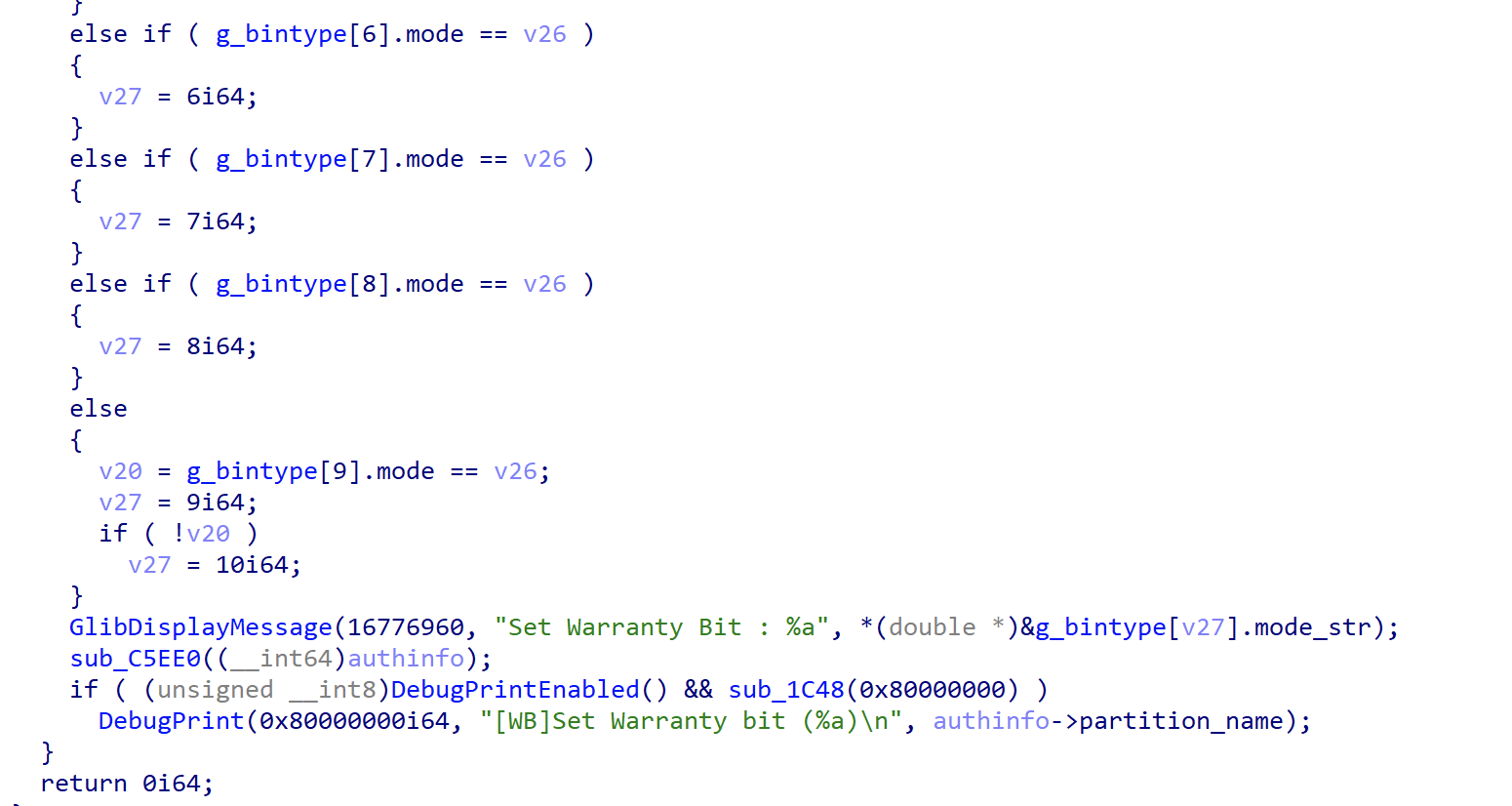
The following snippet is part of a function I labeled PartitionVerification(). Since the binary does not contain reliable symbols for this area, the function name is only an analysis label.
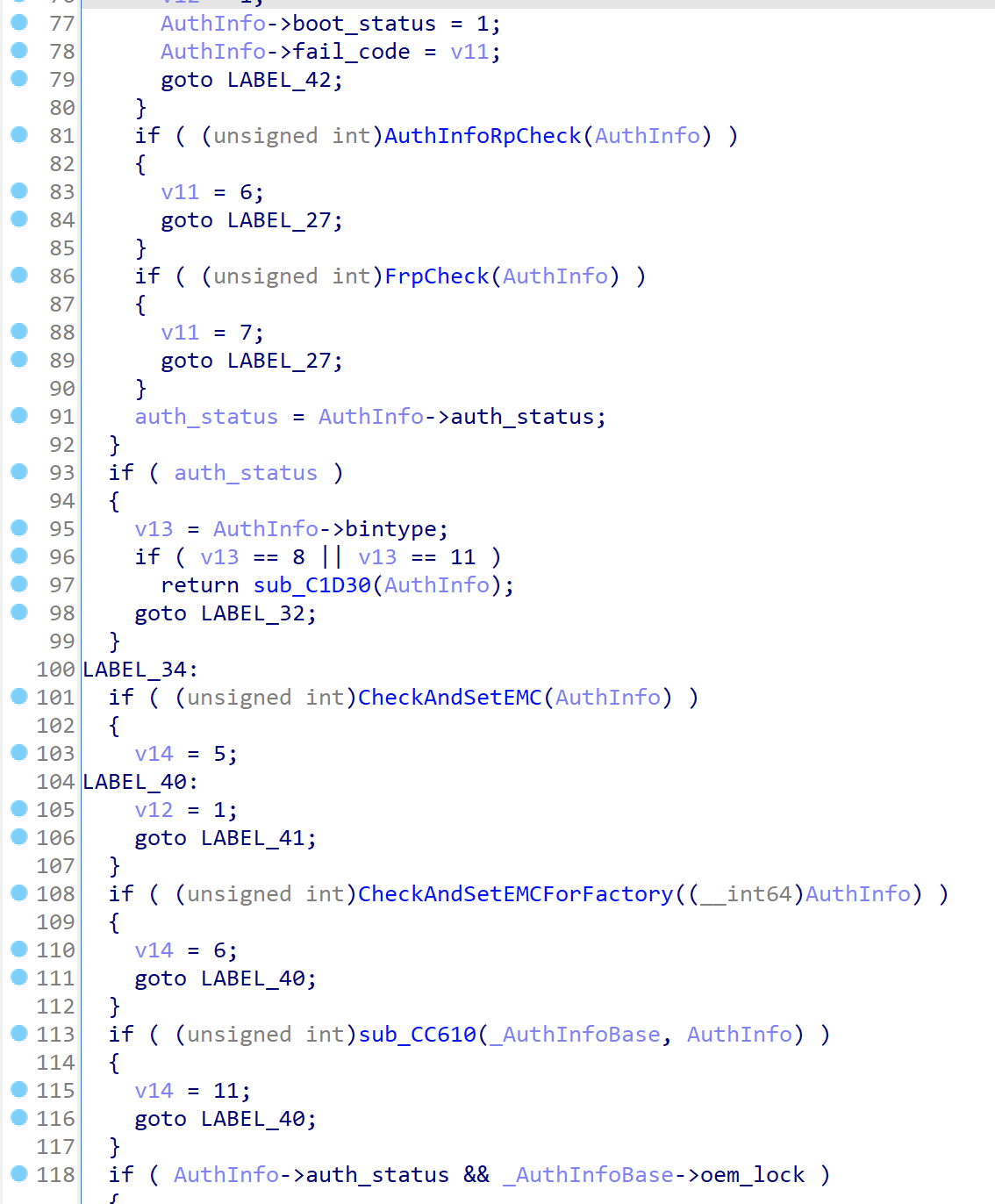
This function appears to perform multiple verification steps using an AuthInfo-like structure for each partition. It also contains logic related to Knox state handling, including cases where the Knox warranty bit may be affected by unexpected partition modification, bootloader unlocking, or similar integrity failures.
There are likely additional KVB-related paths that interact with TrustZone, the hypervisor, or other secure firmware components. I have not fully analyzed every path yet, so I’ll leave those details for a future post if I find something interesting.
Security implications
The important point here is that Samsung’s boot process contains more verification logic than the public Qualcomm LinuxLoader source suggests.
For researchers, this means that simply understanding AVB is not enough when analyzing Samsung bootloaders. A modified image may pass one layer of verification but still fail later due to Samsung-specific metadata, rollback checks, secure world state, or Knox policy decisions.
From an attack surface perspective, LinuxLoader is interesting because it sits at a very sensitive boundary. It processes external or semi-external data such as boot images, partition metadata, command-line parameters, and download-mode input before Android starts. Bugs in this stage can be especially valuable because they occur before the normal Android security model is available.
At the same time, exploitation is usually not straightforward. ABL runs in a constrained firmware environment, and successful tampering may still need to satisfy hardware-backed secure boot, AVB, rollback protection, KVB, and secure world policy checks.